How do I display an email on a Confluence page?
 MSG & EML Email Viewer for Confluence
A year from now someone will open the page and want to know what was actually sent, not what the person writing the page remembered of it. That is the test for an email on a Confluence page: can a reader later see the message as it arrived, with its sender, its date, its wording and whatever came with it, and be sure that is what they are looking at?
This guide looks at how emails usually end up on pages, what Confluence itself does with an email file, how to show the email in place on the page, who can see it once it is there, and what happens when the file is replaced or the page is copied. We make an app for the showing-it-in-place part, and say so here so that you read the rest with that in mind.
How do emails usually end up on a page?
Most often as pasted text: the body selected in the mail program and dropped into the page. What reaches the page is the wording. The sender, the recipients, the date and the sending server stay in the mailbox, tables and signatures flatten, images drop out, and the email’s attached files are left behind in the mailbox. Once it is page text it is only page text. A reader later cannot tell the paste from the original, and has nothing to check it against.
Some people save the email as a file instead, a .msg from Outlook or an .eml from most other mail programs, and drag it onto the page, where Confluence accepts it like any other upload (Atlassian: Upload a file). The message then travels with the page as the mail program wrote it, headers, formatting and attached files included. What the page shows for it is a file tile. The third habit is a screenshot or a PDF printout of the email, which preserves its appearance and nothing else: there is no attached file to open, no header to read, and an image of a table is not a table.
What does Confluence do with an attached .eml or .msg?
It stores it and lists it. The file appears on the page as a tile with Preview and Download options (Atlassian: Display files and images), and in the page’s attachments view under its name, size, uploader and date. The attachments macro lists it the same way (Atlassian: Insert the attachments macro).
Confluence’s preview is where it stops. Not every file type can be displayed on a page (Atlassian: Upload a file), and when we opened the previews on our own site, Confluence said it could not preview the .msg and offered a download instead, and showed the .eml as its raw source: the header lines, the MIME boundaries, the HTML tags, and the inline image and the attached PDF as blocks of encoded text. What a reader gets from either preview is the container rather than the message: a download prompt for the .msg, and for the .eml the encoded source, with the body and its images as blocks of text. Neither shows the email as the sender wrote it.
How do I show the email itself on the page?
MSG & EML Email Viewer for Confluence, our app, is a macro that displays an email file attached to the page as a readable email, in place.
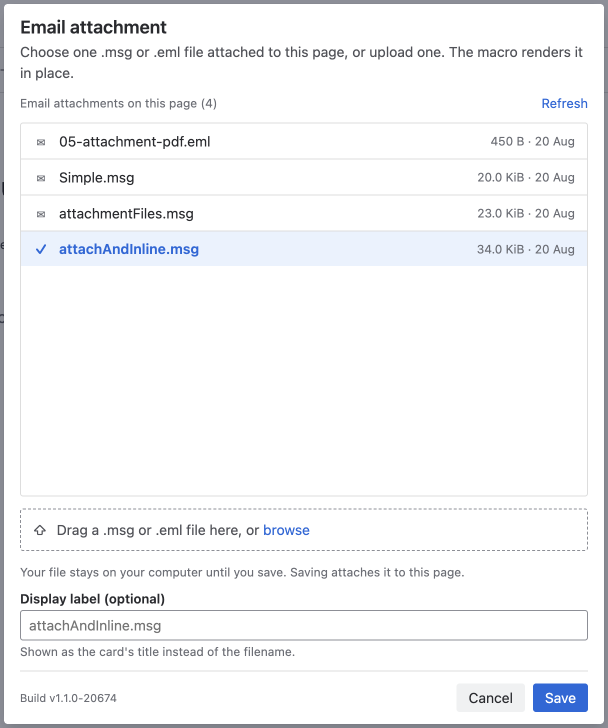
Edit the page, type / and part of the macro’s name, and insert it. Its panel lists the .msg and .eml files already attached to the page; choose one, or drop the file onto the panel and it is attached when you save. Publish the page and the email renders where the macro sits.
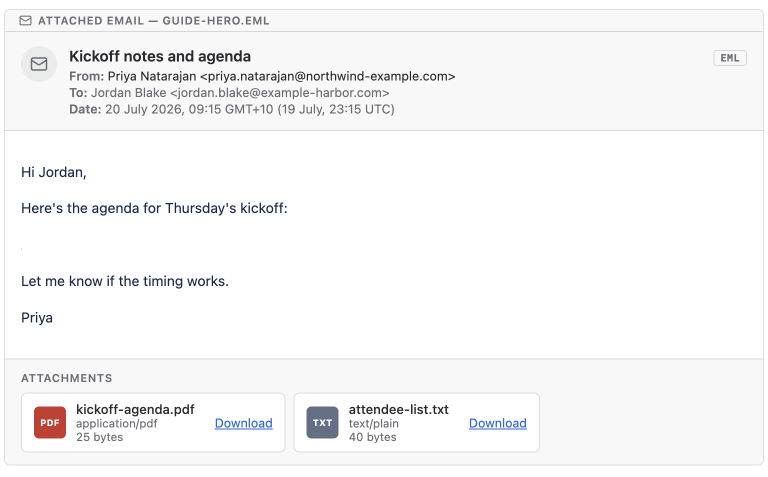
What the reader gets is the email as it was sent: subject, From, To and Cc, the date recorded in the file, the body with its tables and inline images, and the email’s own attachments as tiles with a Download for each. Above it all is a strip reading “Attached email” and the file’s name, so a reader can see this is the file on the page and not a retyped copy. The file is read again every time the page is viewed, so the card always shows what the attached file says now.
Who can see the email once it is on the page?
Everyone who can see the page. The email is a page attachment, and anyone with permission to view a page can download its attachments (Atlassian: Manage uploaded files). The macro reads the file as the person viewing the page, under Confluence’s own permissions, so it shows the email to exactly the people Confluence would let download it, including guests and, where a space allows them, anonymous readers.
If the email is confidential, restrict the page. View restrictions carry down to child pages, and restricted content does not appear for people without access, in the page tree or in macros (Atlassian: Change who can find content). The macro writes nothing of the email into the page, and we run no server or store that could hold a copy; the page’s attachment is the only copy there is.
What happens when the file is replaced, or the page is copied?
Uploading a file with the same name replaces the attachment and keeps the old one in its version history (Atlassian: Manage uploaded files). Because the macro reads the file afresh on each view, the page then shows the new version. If the attachment is deleted, the macro shows a card saying the email attachment is not available; edit the macro and choose a file again.
Duplicating a page copies its attachments, labels and restrictions (Atlassian: Move, copy, and hide content items). The copied page’s macro looks for its file among the copy’s own attachments, by name when the copy’s attachment has a new id, so the email renders on the copy as well.
Exporting the page to PDF renders the email as it appears on the page. A Word export cannot run the macro, so it carries the email as text: the header rows, the plain-text body and the names of the attachments (Atlassian: Export a space’s content).
What we checked, and when
On 5 November 2026, on our own Confluence Cloud site, we opened a page with a .msg attached and attached an .eml to another. Both sat on their pages as file tiles, and the attachments view listed each as a File with its size. Confluence’s preview reported that it could not preview the .msg and offered a download; the .eml preview showed the file’s raw source. The Atlassian pages linked above were read the same day.
Quick answers
Can I paste an email into a Confluence page? Yes, but only the wording arrives. The sender, the date, the formatting and the attached files stay behind, and a reader later cannot tell the paste from the original.
What happens if I attach the .msg or .eml file instead? Confluence keeps the whole email as a file. Readers see a tile and a download option, not the email. Whether a reader can open and view the downloaded file depends on the file format and the software available to them.
Does Confluence preview an attached email? Not as an email. When we checked, the preview of a .msg said the file could not be previewed, and the preview of an .eml showed its raw source.
How do I show the email on the page itself? Attach the file and point an email viewer macro at it. MSG & EML Email Viewer for Confluence renders it in place with its headers, body, inline images and attachments.
Who can see an email displayed this way? Anyone who can view the page. It is a page attachment, and the macro reads it under the page’s own permissions.
What if the email is confidential? Restrict the page. Restrictions apply to the attachment and to the macro alike.
What happens if the attachment is replaced? Uploading a file with the same name creates a new version, and the page shows the new version on its next view.
What happens if the page is duplicated? Confluence copies the attachments, and the macro on the copy finds its file by name.
Does the app fetch emails from a mailbox? No. Something has to attach the email file to the page first; the macro only displays what is already there.
Are the email’s own attachments shown? They are listed at the foot of the email, each with a Download. An email attached inside the email is listed, not opened.
View on Marketplace MSG & EML Email Viewer for Confluence user guide