Mermaid Diagrams 2.9: Mermaid 12 and a front matter editor
 CloudScript Mermaid Diagrams for Confluence
Version 2.9
CloudScript Mermaid Diagrams for Confluence
Version 2.9
Version 2.9 of CloudScript Mermaid Diagrams for Confluence is now live on the Atlassian Marketplace. The release adds Mermaid 12 support, while retaining support for Mermaid 11 in the app, allowing a Mermaid version to be recorded for each diagram. As a result, your existing diagrams created with Mermaid 11 continue to display after the update, and moving a diagram to the newer Mermaid version is a decision made one diagram at a time. The macro’s configuration panel also gains a visual editor for easier configuration of settings that previously had to be written by hand as YAML at the top of the diagram.
Mermaid 12, one diagram at a time
The app now includes Mermaid 12 (12.1.0 in this release) alongside Mermaid 11 (11.15.0), and a new Version setting in the configuration panel chooses between them for each macro. New diagrams start on Mermaid 12. Every diagram created before this release stays on Mermaid 11 until someone opens its configuration panel and changes Version, and it can be changed back in the same way.
We kept both versions because Mermaid 12 does not draw every diagram the way Mermaid 11 did. A flowchart with no theme set, for example, renders in Mermaid 12’s newer default style and with different spacing. Upgrading every diagram automatically would therefore have changed the appearance of published pages that nobody had edited. A page only downloads the Mermaid versions its diagrams use.
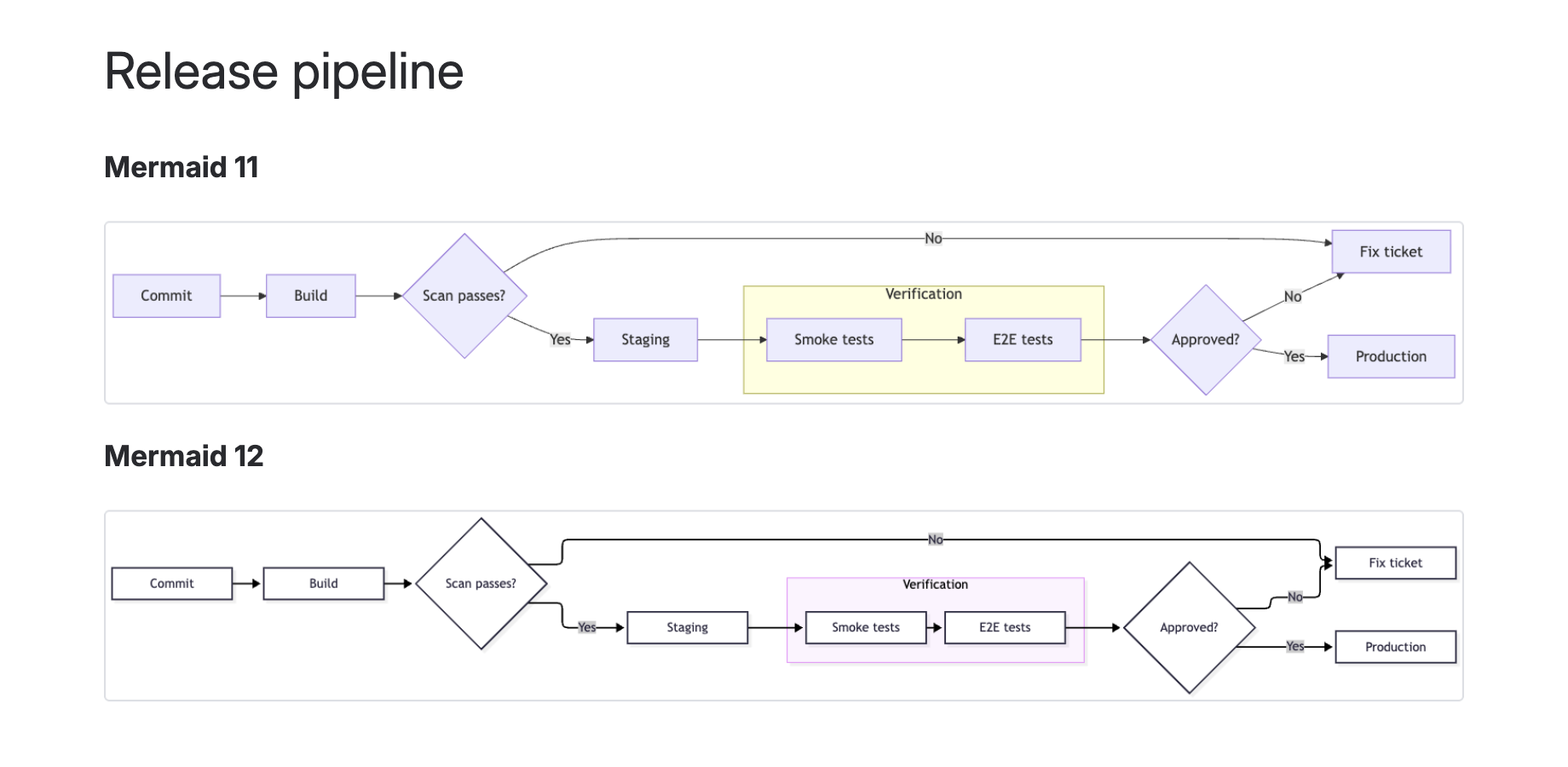
Mermaid 12 also adds diagram types that Mermaid 11 does not have. Swimlane diagrams (swimlane-beta) are one example: they render on Mermaid 12 and report a diagram error if Mermaid 11 is selected for the diagram.
A visual editor for front matter
Mermaid reads a diagram’s title, theme, look and layout from its front matter, the block of YAML between two --- lines at the top of the source. Until now those settings had to be typed as code. The configuration panel now has Title, Theme, Look and Layout controls underneath the source box, and they stay in step with the text: changing a control writes the setting into the front matter, and editing the front matter by hand updates the controls. Front matter settings and comments that the editor does not manage are left as they were written.
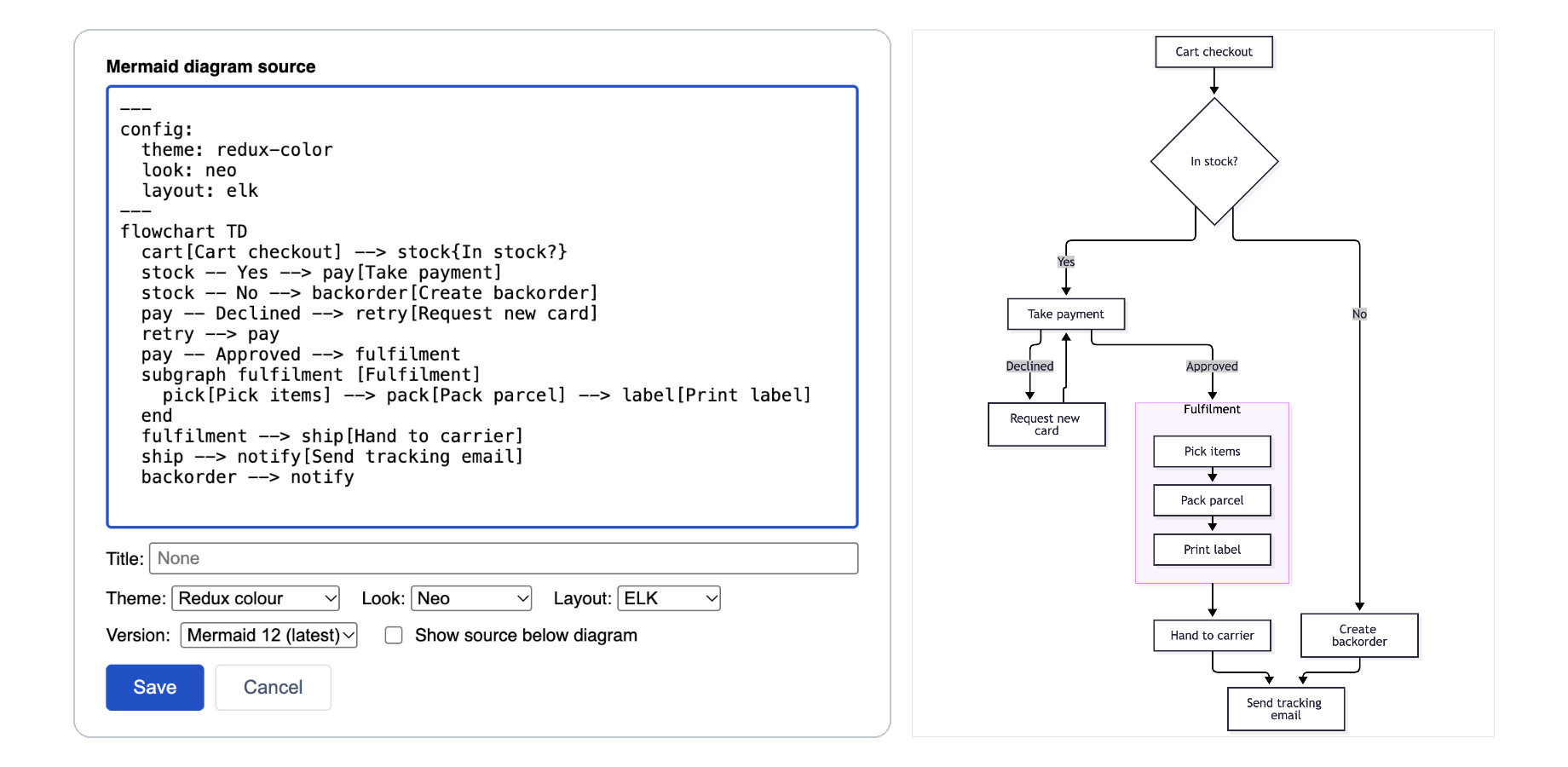
The Theme list grows from four options to twelve, adding the Neo and Redux families and a Custom colours theme with fill, border, text and line colours. Look offers Classic, Hand-drawn and Neo. Layout offers ELK, which previously had to be written into the front matter by hand. Each of the three also has an Automatic option that leaves the setting out, so Mermaid chooses what suits the diagram type. Every theme and look works with both Mermaid versions.
What has not changed
This release makes no change to the app’s permissions or data handling. Each diagram is still drawn in the reader’s browser from the source stored in the macro on your Confluence page, and nothing is sent outside Atlassian. Existing installations update automatically and no administrator action is needed. Diagrams are still included in Confluence’s Export to PDF, and Export to Word is not yet available.
Read more in our updated User guide.